Designing a Food Book Cover with Creative Freedom
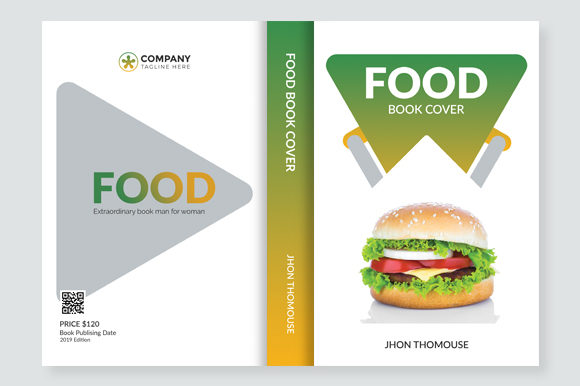
Whether you're an aspiring author, a food blogger, or a chef looking to share your culinary journey, the Food Book Cover template offers a powerful and flexible starting point. Designed for both print and digital use, this resource empowers creators to craft visually compelling covers that reflect their unique voice and vision in the world of food literature.
Why Choose This Food Book Cover Template?
The Food Book Cover is more than just a design—it's a foundation for storytelling through visuals. With a resolution of 300 DPI and CMYK color settings, it’s fully optimized for professional printing. The A4 size ensures compatibility with most standard book formats, while the PSD file allows for deep customization using Adobe Photoshop. What truly sets it apart is its organised layer structure, which makes it easy for designers of all skill levels to edit individual elements without disrupting the overall layout.
Customization at Your Fingertips
One of the standout features of the Food Book Cover template is how editable and customizable it is. Every major element—text, background, imagery, and typography—is separated into layers, giving you full control over each component. You can replace the featured food images with ones that better represent your content, adjust the color scheme to match your brand identity, or tweak the layout to suit different genres such as cookbooks, recipe collections, food memoirs, or even restaurant menus.
The included Lato font adds a modern and readable touch to the title and body text, but nothing stops you from experimenting with other typefaces if they align better with your project’s tone. Whether you're designing for a luxury cookbook or a casual food blog compilation, the flexibility of this template ensures you can achieve the perfect aesthetic.
Exploring Creative Possibilities
Let’s dive into some creative directions you can take with the Food Book Cover template:
- Cultural Cuisine Focus: Use local ingredients or traditional dishes as central visual elements to highlight regional flavors and cooking styles.
- Thematic Series: Design variations for seasonal recipes, holiday cookbooks, or themed editions like "Vegetarian Delights" or "Street Food Adventures."
- Author Branding: Incorporate personal touches like signature colors, logos, or even hand-drawn illustrations to build a recognizable style across your works.
- Minimalist Elegance: Strip back the design to focus on a single high-quality image of a dish, paired with clean typography for a sophisticated look.
- Illustrative Artistry: Replace photographs with vector illustrations or watercolor sketches for a whimsical or artistic feel.
Practical Applications Across Industries
This template isn't limited to authors or publishers. Here are a few real-world applications where it can shine:
- Marketing & Advertising: Create eye-catching promotional materials for new food products, restaurant campaigns, or event announcements.
- Education: Teachers and educators can use it to design engaging course materials about nutrition, food science, or cultural studies.
- Freelance Projects: Freelancers offering graphic design services can quickly produce multiple versions of a cover for clients in the food industry.
- Entrepreneurship: Startups launching meal kits, food delivery apps, or online cooking classes can use the cover as part of their branding package.
- Community Projects: Local food initiatives or charity cookbooks can benefit from a cohesive, professional appearance without the need for advanced design skills.
Realistic Examples of Customization
Imagine you're creating a cookbook focused on healthy eating. You could swap out the default image for one featuring vibrant vegetables, fruits, or grains. Change the color palette to greens and earth tones to evoke freshness and wellness. Add a subtitle like “Nourish Your Body, One Recipe at a Time” beneath the main title for clarity and impact.
Or picture yourself as a travel blogger who wants to release a photo essay on street food around the globe. The Food Book Cover could be adapted to include a collage of diverse foods, with the title stylized in bold, colorful fonts to capture attention. You might also add a small logo of your blog or a tagline that hints at the adventure within the pages.
How Different Users Can Adapt the Template
Each user has distinct needs and goals when it comes to book design. Let’s break down how various professionals might leverage the Food Book Cover:
- Designers: Use the layered PSD to experiment with layouts, fonts, and visuals before presenting final options to clients.
- Bloggers: Combine your best food photos with catchy headlines to create a downloadable PDF or eBook version of your popular posts.
- Restaurants: Develop branded menu books or storybooks showcasing your history, philosophy, and signature dishes.
- Small Business Owners: Showcase your product line (like sauces or spices) in a beautifully designed catalog-style book.
- Educators: Turn classroom projects into printed resources for students or community members interested in learning about food culture.
Tips for Creating a Clear and Effective Food Book Cover
With great flexibility comes the challenge of making smart design choices. Here are some tips to ensure your Food Book Cover remains impactful and audience-friendly:
- Know Your Audience: A cookbook for kids will differ significantly from one targeting gourmet chefs. Tailor the design to reflect the target reader’s preferences and expectations.
- Keep It Organized: Stick to a clear hierarchy. Place the title prominently, support it with a short subtitle or tagline, and use visuals that immediately convey the book’s theme.
- Consistency Matters: If your book includes chapters or sections, consider using consistent color schemes, fonts, and imagery throughout to maintain a professional look.
- Balance Creativity and Readability: While artistic expression is key, make sure the title is legible and the message is clear. Avoid cluttered backgrounds that may distract from the text.
- Use High-Quality Imagery: Since the template supports print-ready quality, always source or photograph your food images in high resolution to avoid pixelation.
Adapting the Food Book Cover for Digital Platforms
In today’s multi-platform world, a great book cover must work well beyond the printed page. The Food Book Cover can easily be adapted for:
- Social Media Previews: Resize the cover to fit Instagram, Pinterest, or Facebook banners, keeping the same visual appeal in smaller formats.
- eBook Covers: Convert the design into JPEG or PNG format suitable for Amazon Kindle, Apple Books, or other e-commerce platforms.
- Website Banners: Use the same design language across your website to maintain a cohesive brand presence.
- Email Newsletters: Feature the cover as the header image in a launch announcement email to readers or customers.
These adaptations not only streamline your workflow but also help build brand recognition across channels.
Where to Find Inspiration for Your Food Book Cover
If you’re unsure where to start, here are a few sources of inspiration to guide your creative process:
- Browse food photography portfolios on sites like Unsplash or Shutterstock to find striking visuals that resonate with your theme.
- Look at the covers of successful food books for ideas on layout, typography, and storytelling through design.
- Explore packaging designs from gourmet brands or restaurants to see how they use color and imagery to communicate taste and quality.
- Draw from your own experiences. Think about what emotions or memories you want the cover to evoke—freshness, comfort, adventure, or indulgence?
Recommended Tools and Resources
To maximize the potential of the Food Book Cover template, consider using these tools:
- Adobe Photoshop: For editing the provided PSD file and customizing layers effectively.
- Canva or Adobe Express: If you prefer drag-and-drop simplicity, convert the design into a base template there for quick edits.
- Font Libraries: Explore Google Fonts or Adobe Fonts for alternative typefaces that complement your content.
- Stock Image Sites: Access high-resolution food images to enhance the visual storytelling of your cover.
- Print Services: Use online printers like Lulu, IngramSpark, or Printful to turn your design into a physical product with ease.
Final Thoughts on Crafting a Unique Food Book Cover
At its core, the Food Book Cover is a tool that invites creativity while ensuring technical excellence. By understanding your purpose, knowing your audience, and leveraging the template’s flexibility, you can create a cover that doesn’t just look good but communicates your message clearly and memorably.
So whether you're launching a new venture, documenting a passion project, or simply exploring the intersection of design and cuisine, this template gives you the freedom to bring your vision to life. Take time to plan your design, test variations, and stay true to the story you want to tell. The right cover can turn curiosity into clicks—and clicks into readers.